Business Model PowerPoint: A Practical Evaluation for Professional Presentations
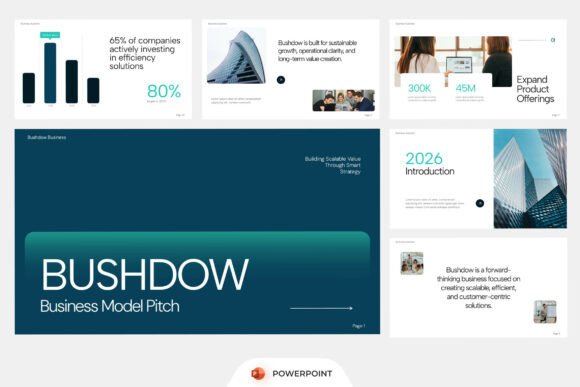
Business Model PowerPoint is a purpose-built corporate presentation template designed to support structured, credible, and visually cohesive business communications. It is not software or a SaaS tool, but a ready-to-use PowerPoint file package intended for professionals who need to convey strategy, operations, financials, or growth plans clearly and efficiently. Its architecture reflects common business storytelling needs—such as company profiles, startup pitches, investor decks, strategic roadmaps, and annual reporting—without requiring design expertise or extensive slide rebuilding.
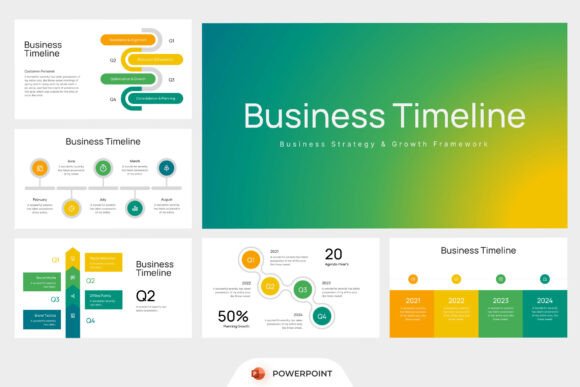
At its core, Business Model PowerPoint offers a set of professionally arranged slides with consistent typography, color logic, and layout discipline. Key structural components include data-driven infographics (e.g., market segmentation charts, SWOT visualizations), timeline sections for product launches or milestones, dedicated financial overview slides (revenue models, cost structures, unit economics), and modular corporate presentation pages (team bios, service offerings, competitive positioning). These elements are built on a 16:9 widescreen ratio—the current standard for projector displays and modern monitors—ensuring compatibility across presentation environments.
Users gain immediate access to fully editable PowerPoint files (.pptx), meaning every shape, chart, text box, and icon can be modified without restrictions. A help guide is included to clarify layer organization, placeholder usage, and basic customization steps. The package also bundles a free font license, eliminating licensing concerns during internal or external distribution. Notably, stock imagery is not included; users are expected to supply their own photos or licensed assets, preserving flexibility while avoiding embedded copyright risks.
Why might someone consider Business Model PowerPoint? Common motivations include time efficiency in deck creation, consistency across recurring reports (e.g., quarterly business reviews), and alignment with stakeholder expectations for polished, boardroom-ready materials. Entrepreneurs preparing seed-stage pitch decks often seek templates that balance narrative flow with analytical rigor—this template supports that by separating conceptual frameworks (like value proposition canvases) from quantitative summaries (like burn rate projections). Similarly, consultants building client-facing strategy decks benefit from pre-formatted sections that reduce formatting overhead and emphasize content quality over visual experimentation.
The primary benefits lie in standardization and speed. Because layouts follow proven presentation conventions—clear hierarchy, minimal text density, intentional whitespace—users avoid common pitfalls like overcrowded slides or inconsistent data visualization. Editability extends beyond text: charts are built using native PowerPoint shapes and SmartArt, allowing updates to figures without external tools. This makes the template especially useful for finance teams updating KPI dashboards or marketing departments iterating campaign performance summaries. The absence of complex animations or embedded macros also improves file stability and cross-version compatibility—critical when sharing with clients or investors using older PowerPoint versions.
However, tradeoffs exist. Business Model PowerPoint prioritizes clarity and professionalism over creative differentiation. Users seeking highly branded, animated, or interactive presentations may find its aesthetic restrained. It does not integrate live data feeds (e.g., Excel-linked charts that auto-update), nor does it support advanced interactivity like hyperlinked navigation menus or embedded video triggers—features more common in custom-built or web-based presentation platforms. Additionally, while the template is easy to customize in broad strokes (colors, logos, text), deep structural changes—such as merging timeline and financial slides into a unified dashboard—require intermediate PowerPoint proficiency.
Expectations should align with its scope: this is a starting point, not an end-to-end solution. Users should anticipate spending 1–3 hours tailoring content, selecting appropriate imagery, and refining messaging—not designing from scratch, but thoughtfully adapting. Success depends less on technical skill and more on having well-defined objectives: clear audience goals, finalized data points, and a coherent narrative arc. Without those inputs, even the most polished template cannot compensate for weak strategy or unclear positioning.
Business Model PowerPoint is a strong fit when the priority is delivering substance with credibility under time constraints. Examples include startups preparing for investor meetings where first impressions hinge on clean, logical flow; agencies producing standardized client strategy decks across multiple accounts; or internal teams developing annual planning materials that must adhere to corporate brand guidelines. It also suits professionals who frequently repurpose content—e.g., converting a written business plan into a presentation—because its modular design allows reordering and selective use of slides without breaking visual continuity.
Conversely, alternatives may be preferable in certain situations. For teams needing real-time collaboration, cloud-native tools like Google Slides or Microsoft PowerPoint for the web offer superior version control and simultaneous editing—capabilities absent in static .pptx files. If dynamic data integration is essential (e.g., pulling live sales metrics into charts), tools like Tableau Public or Power BI embedded in PowerPoint may better serve analytical depth. Designers or marketing leads pursuing distinctive visual identity—custom illustrations, motion graphics, or bespoke typography—may find greater flexibility in Figma or Adobe After Effects workflows, despite higher learning curves. And for educators or non-profits operating under tight budgets, free open-source alternatives like LibreOffice Impress offer compatible templates, though with fewer business-specific layouts.
Decision-making hinges on three practical considerations. First, assess your content maturity: if core messaging, financial assumptions, and strategic priorities are already defined, Business Model PowerPoint accelerates delivery. Second, evaluate your team’s capacity: if PowerPoint fluency exists but design bandwidth is limited, the template reduces friction. Third, clarify distribution needs: if decks will be shared widely—including with stakeholders outside your organization—its self-contained, font-included format minimizes rendering issues compared to cloud-dependent or plugin-reliant solutions.
Ultimately, Business Model PowerPoint serves a specific niche: professionals who value structure, consistency, and editability in business storytelling. It does not replace strategic thinking or data analysis—but it does remove avoidable barriers between insight and audience. When evaluating whether it fits your workflow, ask not whether it looks impressive in isolation, but whether it helps you communicate more effectively, reliably, and efficiently within your existing constraints.