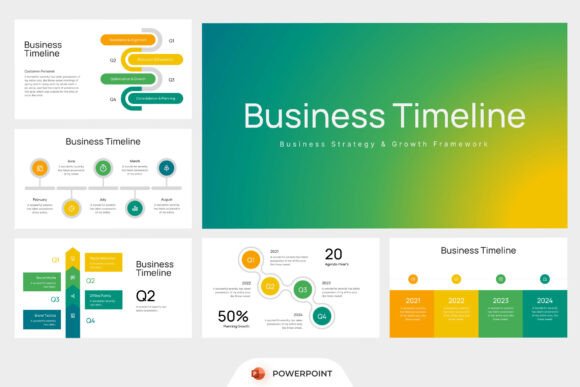
Business Timeline PowerPoint: A Practical Tool for Clear Strategic Communication
Business Timeline PowerPoint is a purpose-built presentation template designed to visualize time-based business narratives—whether that’s a startup’s go-to-market sequence, a product launch roadmap, or a multi-year corporate transformation plan. Unlike generic slide decks, it centers on structured chronology: quarterly milestones, phased workflows, progress benchmarks, and data-integrated timelines. Its value lies not in visual flair alone, but in how effectively it supports clarity during high-stakes conversations—board updates, stakeholder alignment sessions, investor reviews, or cross-functional planning workshops.
What Sets Business Timeline PowerPoint Apart
At its core, Business Timeline PowerPoint prioritizes editability and functional layout. Every slide is fully customizable in Microsoft PowerPoint—no locked layers, no embedded graphics requiring external software. The 16:9 widescreen ratio accommodates modern display standards without cropping or scaling issues. All fonts are included and licensed for commercial use, eliminating licensing surprises or font substitution glitches. The package delivers clean .pptx files plus a concise help guide—not a dense manual, but practical notes on swapping colors, adjusting timeline bars, or reordering milestone cards.
Crucially, the design avoids abstraction. Instead of decorative icons or stylized illustrations, it uses consistent, scalable infographic elements: horizontal timeline bars with labeled quarters, stacked workflow lanes, dual-axis progress charts, and milestone markers tied to specific dates or phases. This makes it especially useful when accuracy matters—like showing how Q3 marketing campaigns align with engineering sprints and sales enablement timelines.
How It Compares to Other Timeline Presentation Approaches
Timeline communication happens across many formats—and each has tradeoffs. Static infographics (e.g., PNG or PDF exports) look polished but resist updates. Custom-built slides from scratch offer maximum flexibility but consume hours—especially when consistency across dozens of slides is required. Web-based tools like Miro or Lucidchart support real-time collaboration but often lack the polish and branding control needed for formal presentations.
Business Timeline PowerPoint sits between those extremes: it provides a professional, cohesive starting point while preserving full control inside a widely adopted tool. Unlike templates built for Keynote or Google Slides, it’s optimized for PowerPoint’s native features—morph transitions, animation triggers, and slide master behaviors—so users don’t hit compatibility walls mid-edit.
It also differs from “all-in-one” presentation suites sold as subscription services. Those often bundle hundreds of slides across unrelated topics, diluting relevance. Business Timeline PowerPoint focuses narrowly on time-structured business content—no extraneous pitch decks, financial statement slides, or HR onboarding modules. That focus means less sorting, less deleting, and faster adaptation to your actual needs.
Strengths in Real-World Use Cases
Startups preparing seed-stage investor decks benefit from its ability to compress complex development sequences into digestible visuals—e.g., mapping MVP testing, user feedback loops, and feature iteration across six-month windows. Marketing teams use it to align campaign calendars with content production, channel rollout, and performance review cycles—without needing to rebuild timelines every quarter.
Consultants rely on it during discovery workshops: inserting client-specific dates, renaming phases (“Discovery → Design → Pilot → Scale”), and color-coding ownership (R&D vs. Operations vs. Legal) directly in the deck keeps discussions grounded and actionable. Because all image placeholders are clearly marked—and stock imagery is intentionally excluded—the template encourages users to insert their own authentic visuals: team photos, product screenshots, or internal dashboard exports.
For annual planning cycles, the quarterly roadmap layouts provide a natural rhythm. You can show not just what’s happening each quarter, but how capacity shifts (e.g., “Q2: 70% engineering bandwidth on Platform Upgrade; Q3: 50% on Integration API”), helping leadership assess feasibility before commitments are made.
Tradeoffs and Practical Limitations
Business Timeline PowerPoint doesn’t automate data. If your timeline depends on live project metrics—like Jira ticket velocity or Asana completion rates—you’ll still need to manually update values. It’s a presentation layer, not a project management system. Similarly, while the template includes progress tracking sections, it doesn’t calculate percentage completion or flag delays automatically. Those insights must be added contextually by the presenter.
The exclusion of stock images is intentional—but means users must source or create their own supporting visuals. That’s an advantage for brand consistency and authenticity, yet adds a small step for teams without ready access to photography or illustration resources.
Also worth noting: because it’s PowerPoint-native, it doesn’t support collaborative editing in real time the way cloud-based tools do. Multiple contributors need to coordinate file versions—or use PowerPoint for the web with version history enabled. For distributed teams already working in Google Workspace, that may introduce friction.
When Business Timeline PowerPoint Is the Right Fit
Consider Business Timeline PowerPoint if you regularly prepare presentations where timing, sequencing, and accountability matter—and you want to reduce design overhead without sacrificing professionalism. It works well when:
- You present to internal stakeholders who expect branded, consistent decks—not placeholder-heavy templates;
- Your audience needs to grasp interdependencies quickly (e.g., how legal sign-off affects go-live date);
- You’re updating roadmaps quarterly or annually and need to maintain visual continuity across versions;
- Your team uses PowerPoint daily and prefers working within a familiar interface over learning new tools;
- You value clarity over novelty—where a clean bar chart conveys more than an animated 3D timeline.
When Another Option Might Serve Better
Business Timeline PowerPoint may be less ideal if your primary need is dynamic, data-driven visualization—for example, pulling live budget spend against timeline phases. In that case, integrating PowerPoint with Excel or using Power BI dashboards could deliver more responsive insight.
If your team collaborates heavily across time zones with frequent parallel edits, a cloud-native solution with robust conflict resolution might streamline workflow—even if it sacrifices some fine-grained design control.
And if your presentations rarely involve time-based structure—if most of your work centers on conceptual frameworks, organizational charts, or comparative analysis—then a broader-purpose template library may offer more versatility per dollar spent.
Making a Grounded Decision
Choosing a timeline presentation resource isn’t about finding the “best” option—it’s about matching tool behavior to your team’s habits, constraints, and goals. Business Timeline PowerPoint excels when you need speed, consistency, and control in a familiar environment. It reduces cognitive load for both creator and audience: fewer decisions about layout, less time reverse-engineering someone else’s template logic, and clearer takeaways during delivery.
That said, its value compounds with intentionality. Users who invest 20 minutes reviewing the help guide—understanding how milestone cards link to timeline bars, or how to adjust quarter labels globally—get significantly more leverage than those who treat it as a “drop-in” graphic. Like any well-designed tool, it rewards thoughtful use rather than passive consumption.
Ultimately, Business Timeline PowerPoint fills a specific gap: it’s neither a project tracker nor a design platform, but a focused bridge between strategic planning and stakeholder communication. When your goal is to make time visible, accountable, and understandable—not just decorative—it’s a pragmatic, quietly capable choice.