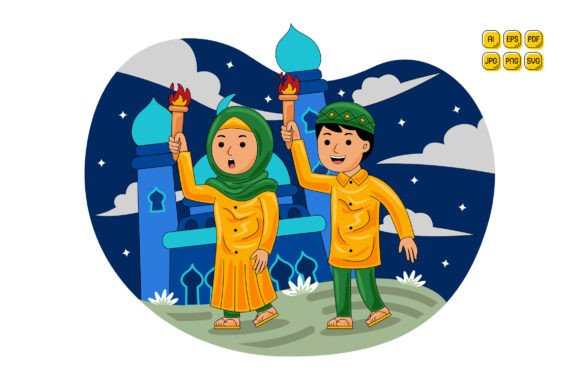
Muslim Man and Woman Holding Torch
A vector illustration of a Muslim man and woman holding a torch is more than symbolic imagery—it’s a functional design asset built for real-world execution. Designed with clarity, cultural resonance, and technical flexibility in mind, this illustration serves as a foundational visual element across business branding, educational content, digital campaigns, and internal communications. Its strength lies not just in its meaning—unity, guidance, shared purpose—but in how seamlessly it integrates into workflows where precision, adaptability, and speed matter.
Where This Illustration Fits in Your Workflow
Design assets are rarely used in isolation. They’re embedded: dropped into a landing page mockup before client review, layered into an infographic draft during content planning, resized for a social media carousel, or recolored to match a brand’s seasonal palette. The Muslim Man and Woman Holding Torch illustration is engineered for exactly that kind of integration. Because it arrives in AI, EPS, SVG, PDF, JPG, and PNG formats—including a transparent PNG and 5000×5000 pixel resolution—you don’t pause your process to convert, re-rasterize, or compromise quality. You open the file, adjust what’s needed, and move forward.
For marketers building Ramadan campaign assets, this illustration can be the central motif in email headers, ad banners, and blog graphics—each version tuned to platform specs without losing fidelity. For educators creating inclusive lesson materials, it becomes part of a larger visual vocabulary: combined with icons for learning, community, or reflection, then exported at exact dimensions required by LMS platforms. Freelancers delivering brand kits to clients use the editable layers to swap colors, isolate figures, or extract silhouettes—all within minutes, not hours.
Customization That Supports Real Decisions
“Easy to edit” isn’t marketing language here—it reflects actual technical capability. Every shape in the vector files is individually selectable and color-adjustable. The torch flame, clothing details, skin tones, background elements—none are merged or flattened. That means you’re not stuck with preset palettes. If your brand shifts from navy-and-gold to sage-and-cream next quarter, you update colors once in Illustrator and export all variations. No redrawing. No asset reordering.
This level of control matters most when consistency intersects with context. A nonprofit using the illustration across annual reports, donor presentations, and workshop handouts needs the same visual voice—but different emphasis. In one setting, you mute the background and highlight the figures; in another, you invert colors for dark-mode compatibility; in a third, you isolate just the torch to symbolize illumination in a leadership training slide. All possible, all fast—because the file structure supports intention, not workarounds.
Practical Implementation Tips
- Start with your output first. Before opening the AI file, decide where the image will live: Is it full-width on a website? A square post for Instagram? A narrow banner for email? Set your canvas size early—then scale or crop intelligently rather than stretching.
- Use layers intentionally. The AI file includes organized layers (e.g., “Figures,” “Torch,” “Background”). Turn off what you don’t need instead of deleting—preserving options if direction changes later.
- Test color combinations early. Try three palette variations against your brand guidelines—not just for aesthetics but for accessibility. SVG and PNG exports retain contrast ratios you set; verify them with tools like WebAIM’s Contrast Checker.
- Combine thoughtfully. Pair this illustration with complementary vectors—like abstract geometric borders, Arabic calligraphy accents, or minimalist mosque silhouettes—to build cohesive scenes. Since all shapes remain editable, alignment and spacing stay precise.
Compatibility Across Tools and Teams
Workflow friction often comes from format mismatch—not idea mismatch. One team uses Figma, another relies on Canva, a third handles print production in InDesign. The Muslim Man and Woman Holding Torch set bridges those gaps. SVG works natively in web development and modern design tools. PDF preserves vector integrity for print-ready handoffs. High-res JPG and PNG ensure pixel-perfect rendering in CMS editors or presentation software that doesn’t support vector imports. Even non-designers—bloggers inserting images into WordPress, HR managers updating intranet pages—can use the PNG or JPG without installing specialized software.
That interoperability reduces bottlenecks. A content strategist can draft copy around the illustration while a designer adjusts colors. A developer embeds the SVG directly into HTML for crisp scaling on any device. A project manager shares the PDF with stakeholders for feedback—knowing they’ll see accurate proportions and typography alignment, not placeholder boxes.
Long-Term Use and Quality Control
Assets get reused—not just across projects, but across years. A well-structured vector file ages gracefully. Because this set includes layered AI and EPS files, future edits remain clean and predictable. You won’t encounter rasterized edges, misaligned paths, or missing fonts—common issues with poorly prepared downloads.
Quality control starts at import. Open the AI file and verify layer naming, grouping, and anchor point placement. Check that strokes are outlined (not live) and text converted to outlines—both done here—so nothing breaks when opened on another machine. Then save a master working file with your brand’s naming convention (e.g., “torch-unified-v2.ai”) and archive it alongside usage notes: which colors were used for last year’s Eid campaign, which SVG version was embedded in the learning portal, which PNG variant had the clearest transparency for mobile overlays.
That documentation turns an illustration into a managed asset—not just a download. It supports onboarding, audits, and scalability. When a new freelancer joins your team, they inherit context, not confusion.
Integration Beyond the Visual
The Muslim Man and Woman Holding Torch illustration also functions as a subtle alignment tool. In collaborative environments—whether cross-departmental product launches or interfaith community initiatives—it anchors messaging around shared values: partnership, visibility, forward movement. Used consistently, it reinforces narrative continuity across touchpoints without requiring explanation. Stakeholders recognize it. Audiences feel its coherence. And creators spend less time justifying visuals—and more time refining strategy.
That’s the practical advantage: it doesn’t replace thinking, but it removes friction from expressing it. Whether you’re prototyping a new service, preparing a grant application, launching a course, or refreshing a brand identity, this illustration meets you where you are—ready to adapt, scale, and clarify.
Happy designing. Happy purchasing. And above all—happy executing.